My Avatar
Every user can have one avatar: an agent that answers
questions about them and on their behalf — role, team,
expertise, current work, how to work with them, availability — from three
things they curated themselves: a profile, a knowledge pool and a memory
pool. Colleagues reach it by name or by @handle. It answers
what it was given, cites what it used, and passes the rest back to its
owner instead of guessing.
For the owner
-
Create it
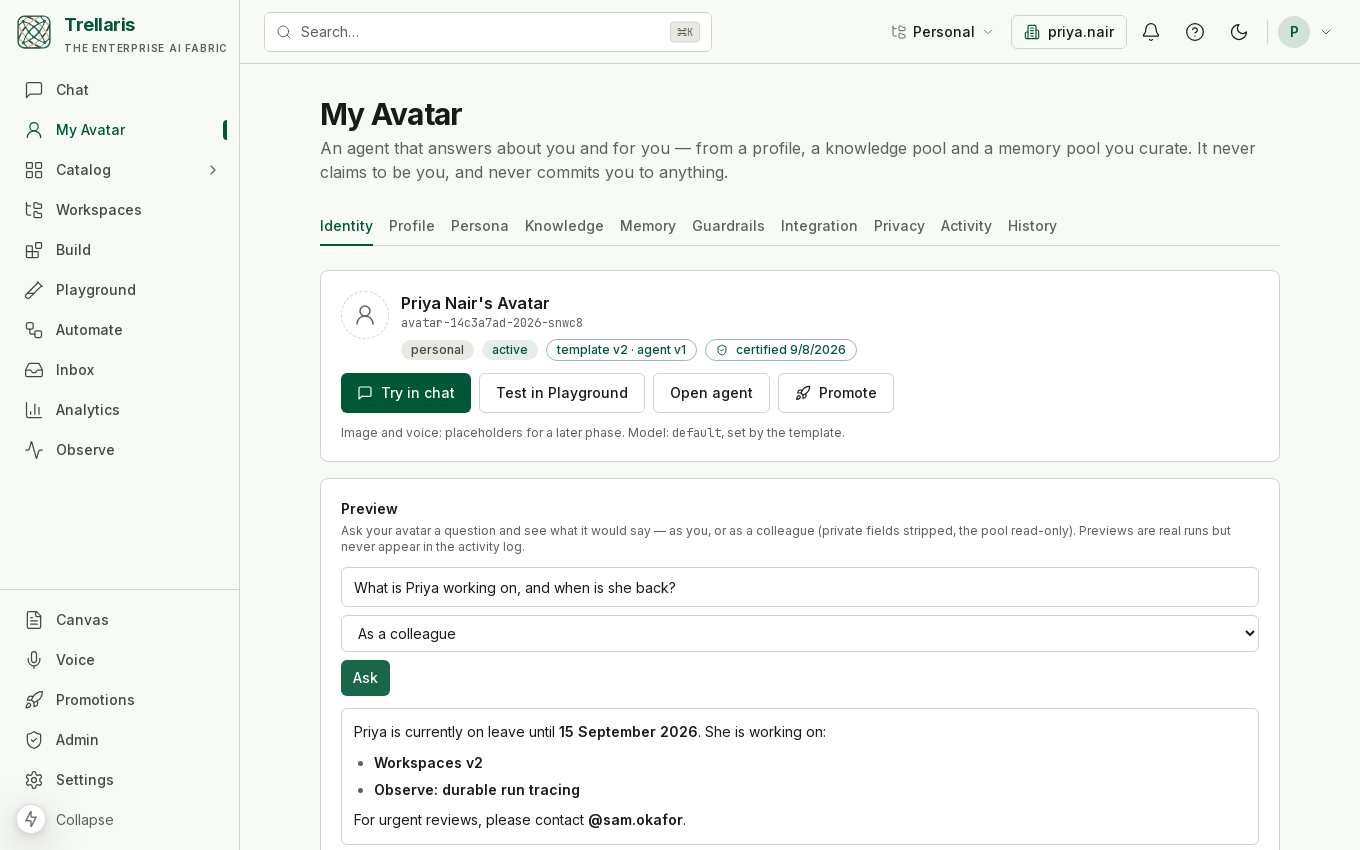
Open My Avatar in the navigation and click Create my Avatar. You get an agent in your personal ring with a generated name such as
avatar-1a2b3c4d-2026-k7q2p, displayed as Priya Nair's Avatar, and the handle@priya.nair— the local part of your email, reserved for you. -
Fill the profile
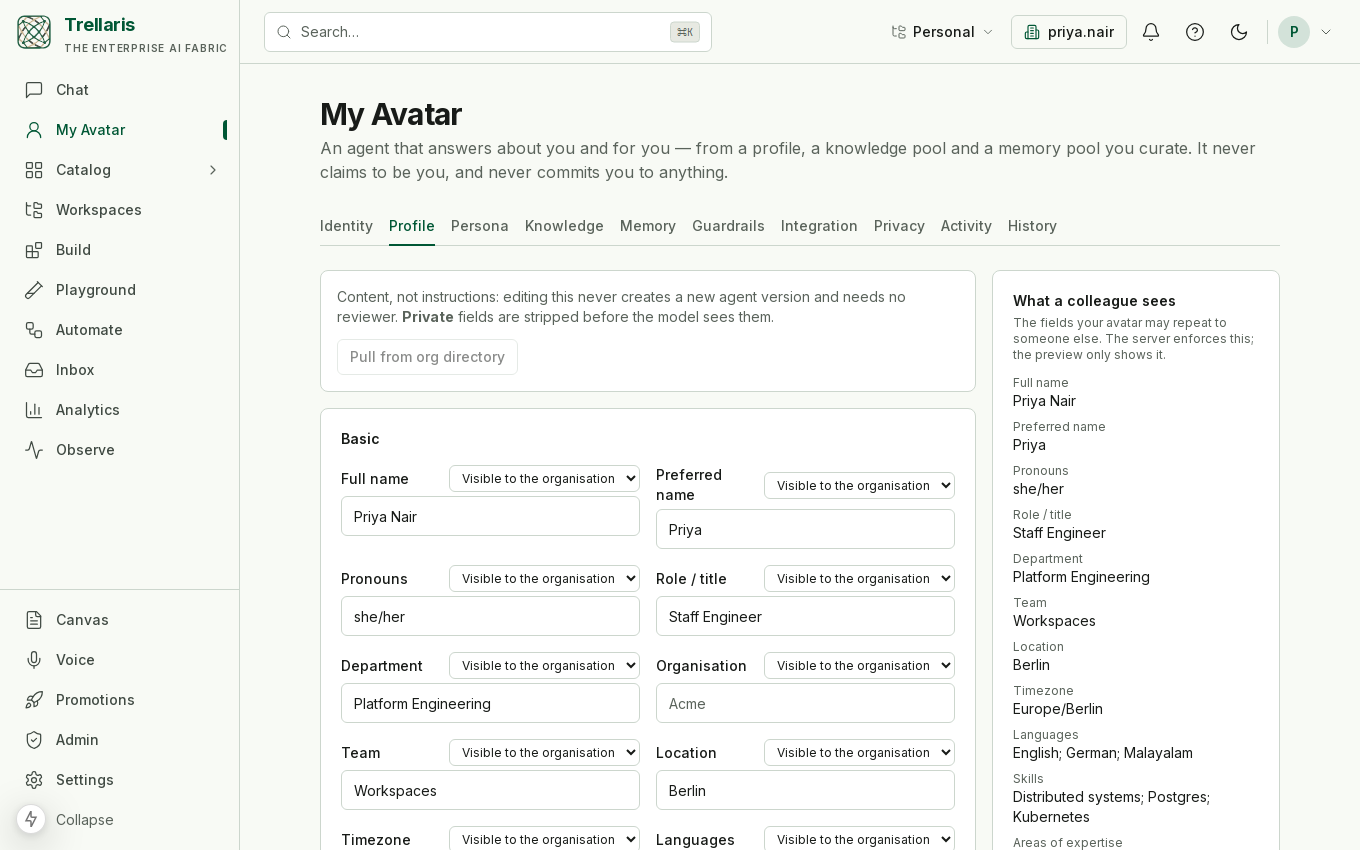
Role, team, location, timezone, reporting line, languages, skills, current projects, preferred channels, an out-of-office note. Every field has its own visibility — private, org or public. A private field never leaves your own conversations with your avatar; the org can cap the maximum visibility.
-
Give it knowledge and memories
The Knowledge tab creates collections only your avatar reads (upload design notes, decision records, a team charter). The Memory tab holds short facts — "prefers async design reviews", "pairs on Thursdays". Both are read by the avatar as you, whoever is asking.
-
Shape how it behaves
Persona (tone, verbosity, style samples, words to prefer or avoid), Guardrails (topics to defer, a confidence threshold, what it may decide for you), Integration (availability, channels, how many colleagues at once, how it treats other agents), and Privacy (consents, a daily or weekly digest, how often to re-certify). Every change is snapshotted; History rolls any of it back.
-
Preview and watch
The preview box on Identity asks your avatar a question as a colleague, so you see exactly what a private field's absence looks like. Activity lists who asked what and what it answered, with citations and thumbs. When the avatar template improves, an Upgrade banner offers the new version.
For everyone else
In the default chat, either of these reaches Priya's avatar:
@priya.nair what are you working on this quarter?
what is Priya's timezone and when is she back from leave?
The first is a mention: the whole message goes to that
agent before any model is consulted, and the composer's @
autocomplete lists the handles you can reach. The second names a
person: the platform resolves the name to a user with an
avatar and dispatches to it. In Slack, mentioning the person works the
same way. The chat header says Speaking for Priya Nair · not Priya
Nair, and the avatar says it is an AI if asked.
When a question is not covered by what Priya shared, the avatar says so in one sentence and offers to pass it on; accepting writes a note to Priya's inbox. It never commits Priya to a meeting, a deadline, an opinion or a decision.
How it works
An ordinary agent with an owner
The avatar is a normal registry agent — versioned, scanned, promotable,
subject to kill switches and policy — with two things that make it an
avatar: an avatar_owner in its definition and
memory: owner. Ownership is enforced on every write: a
definition whose owner is not the person saving it is refused, and no
admin can override that. Promotion copies the definition as it is, so a
promoted avatar in the org ring still speaks for the same person.
Reading as the owner — exactly twice
Normally everything an agent reads is scoped to whoever started the run. An avatar needs to read its owner's memory pool and its owner's knowledge collections on a colleague's behalf, and it does — for those two reads only. Everything else (web search, connectors, other tools) still runs as the person asking. Nothing the owner connected is ever exercised by a colleague.
What reaches the model
For each run the platform assembles the owner's profile (only the fields visible to that audience), the persona, the knowledge rules (citation mode, freshness, FAQs) and the guardrails, and detects whether the asker is a person or another agent. Integration rules — availability, channels, a concurrency cap — are checked before the run starts and can refuse a colleague's request; they never refuse the owner's own.
Memory that stays curated
A colleague's conversation never writes into the owner's pool by itself. Under auto-learn: propose a run files a proposal the owner approves on the Memory tab; under off nothing is proposed. There is no automatic mode, and thumbs on activity never rewrite the persona or the pool on their own.
Decisions it may take
Guardrails record allow / ask-first / deny per action, and only commit dates may be set to allow — it means "state my availability from the profile", which is still an answer. Approving requests, sharing documents or making purchases cannot be allowed: there is no tool behind them, and an allow would be a promise the platform cannot keep.
Handles
A handle is an org-unique @name any agent may hold; every
agent is addressable as @slug from creation, and built-ins
like @ithelp and @market-watcher keep theirs. A
mention dispatches the whole message to that one agent; if it is absent,
paused, killed or not visible to you, the answer is an honest refusal and
no other agent runs — you said whom you meant. Admins can reassign or
release a handle; promotion re-points it to the reviewed copy.
Org controls
| Switch | What it does |
|---|---|
| Avatars enabled | Whether members may create one at all. |
| Allow promotion | Whether an avatar may be promoted out of the personal ring. |
| Maximum field visibility | Caps how widely a profile field can be shared (default: the org). |
| Activity log | Whether questions and answers are recorded for the owner to review. |
Deprovisioning a user kills their avatar and releases the handle. The orchestrator never routes to an avatar on its own; it is reached by mention or by name.